What it is
What the SDK is
AA-SDLC is a methodology and an SDK. The methodology says what good software delivery looks like when agents do much of the work. The SDK turns each step of it into a skill your coding agent can run, anchored on a ticket, producing a named artifact with stated acceptance criteria.
Skills, one per step
Every step of the methodology is a skill: a plain-text file that tells the agent what to read, what to produce, when that counts as done, and which guidance to follow. Each skill is invoked by one command inside the agent, such as /aa-dev-implement or /aa-ba-refine-requirements.
Workflow data as the source of truth
Disciplines, steps, and processes are data files, validated by schema, and the skills, the documentation, and this website are generated from or checked against them. The methodology page is one of those generated pages.
The aa command line
A native binary that installs the skills into your agent at user or project scope, writes the project's aa.config.yaml, updates an install in place, and adds plugins. Inside the agent, /aa-fw-health reports what the install can and cannot reach.
Process, never tool
The skills describe the process and let the agent infer the tool from your project. They work against whatever ticket system, knowledge base, and source control the agent already has, and degrade gracefully when one of them is out of reach.
Honest status
Where it stands
This block is regenerated from the framework repository, so it says what exists rather than what is planned.
What exists today
- 15 disciplines and 6 processes defined as workflow data
- 48 steps, each with a skill and a command: 48 of 48 skills present
- 14 tenets, 27 opinions, 47 requirements, each with a stable id
- 86 feature pages holding 772 approved scenarios: the framework's own requirements, in Gherkin tables, pulled into the repository as feature files
- The
aa command line: verbs setup, init, update, uninstall, plugin, a native binary for six platforms, published to npm as aa-sdlc 0.1.0-alpha.7
- 22 agent harnesses supported by the installer: Claude Code verified in use, 13 checked against a real install on Linux, the others installed as their documentation describes
Counts are regenerated from the repository; if this block is stale, the framework's own tests fail.
The source is on GitHub: DevPossible/aa-sdlc, under the Functional Source License (FSL-1.1-ALv2): use it for anything, including commercial work, but not as a competing product; each version becomes Apache 2.0 two years after release. The command line is on npm as aa-sdlc, with signed Windows binaries and each release on GitHub Releases.
Getting it
How it installs
Alpha. aa-sdlc is on npm as an alpha: a native binary for Windows, Linux, and macOS on x64 and arm64, with the Windows binaries signed by DevPossible LLC. Expect changes between alpha releases; aa update refreshes an install in place.
npm install -g aa-sdlc         # npm installs the native binary for your platform
aa setup                       # detect every agent harness you use and install into each at user scope
cd your-project
aa init                        # write aa.config.yaml, ask which harnesses this repository gets, add the commit hook
Then, inside the agent, run /aa-fw-health. It probes every system the installed skills depend on and reports what is met, unmet, or not applicable, without changing anything. Where aa init asks about your ticket project and knowledge space, paste the URL; the agent looks for a connector it already has rather than the SDK wrapping one.
Agent harnesses
The skills are plain SKILL.md files and read the same in any harness that supports the skills format; only the glue differs per harness: where the skills go, how a command is declared, and hooks where a harness has them. You are not limited to one: aa setup offers every harness it finds as a checklist and installs into each one you keep ticked, writing each skill once per folder even where several harnesses share it, and aa uninstall removes the framework from the ones you pick, leaving the others working. A project can be worked on from several at once.
Claude Code, Codex, Gemini CLI, OpenCode, Pi, and 17 more Show where each installs, its commands, and its subagents
| Harness | Status | Skills go to | Commands | Subagents |
|---|
| Claude Code | Supported, verified in use | ~/.claude/skills | Each skill is its own command | Installed |
|---|
| Codex | Supported, checked on a real install | ~/.agents/skills | Each skill is its own command | The harness has them; not installed yet |
|---|
| Gemini CLI | Supported, checked on a real install | ~/.gemini/skills | TOML commands in ~/.gemini/commands | Installed |
|---|
| OpenCode | Supported, checked on a real install | ~/.config/opencode/skills | Markdown commands in ~/.config/opencode/commands | Installed |
|---|
| Pi | Supported, checked on a real install | ~/.pi/agent/skills | Each skill is its own command | No: runs inline |
|---|
| Cursor | Supported, checked on a real install | ~/.cursor/skills | Each skill is its own command | Installed |
|---|
| GitHub Copilot | Supported, checked on a real install | ~/.copilot/skills | Each skill is its own command | Installed |
|---|
| Windsurf | Supported, per its documentation | ~/.codeium/windsurf/skills | Each skill is its own command | No: runs inline |
|---|
| Cline | Supported, per its documentation | ~/.cline/skills | Each skill is its own command | The harness has them; not installed yet |
|---|
| Roo Code | Supported, per its documentation | ~/.roo/skills | Each skill is its own command | No: runs inline |
|---|
| Kilo Code | Supported, per its documentation | ~/.kilo/skills | Each skill is its own command | No: runs inline |
|---|
| Amp | Supported, per its documentation | ~/.config/agents/skills | Each skill is its own command | No: runs inline |
|---|
| Goose | Supported, checked on a real install | ~/.agents/skills | Each skill is its own command | The harness has them; not installed yet |
|---|
| Zed | Supported, per its documentation | ~/.agents/skills | Each skill is its own command | No: runs inline |
|---|
| JetBrains Junie | Supported, checked on a real install | ~/.junie/skills | Each skill is its own command | The harness has them; not installed yet |
|---|
| Kiro | Supported, checked on a real install | ~/.kiro/skills | Each skill is its own command | The harness has them; not installed yet |
|---|
| Qwen Code | Supported, checked on a real install | ~/.qwen/skills | Markdown commands in ~/.qwen/commands | Installed |
|---|
| Crush | Supported, checked on a real install | ~/.config/crush/skills | Each skill is its own command | No: runs inline |
|---|
| Factory Droid | Supported, checked on a real install | ~/.factory/skills | Each skill is its own command | The harness has them; not installed yet |
|---|
| Augment Auggie | Supported, per its documentation | ~/.augment/skills | Each skill is its own command | The harness has them; not installed yet |
|---|
| Hermes | Supported, checked on a real install | ~/.hermes/skills | Each skill is its own command | The harness has them; not installed yet |
|---|
| Warp | Supported, per its documentation | ~/.agents/skills | Each skill is its own command | No: runs inline |
|---|
| Aider | Not supported | it loads no skills and has no user-defined commands; give it a conventions file with --read instead |
|---|
| Continue | Not supported | its support for SKILL.md skills is not documented; prompt files must be registered in its own config |
|---|
Subagents where the harness has them, the same steps where it does not. Some work is worth more from a separate mind: a review by someone who did not write the change, tests by someone who did not see the implementation's reasoning, a security pass with its own context. Where a harness supports subagents, AA-SDLC gives each discipline its own, generated from the same workflow data and guidance as the skills, so the two never drift, and the review, testing, and security steps hand their independent part to it. Where a harness has no subagents, the same skill does that part itself in the main conversation: every step still runs and produces its artifact, and only the separate context is lost. Plugins need no agents of their own; a plugin's skills run under the agent of the discipline whose step they attach to. The table says, for each harness, whether the subagents are installed, whether the harness has subagents the framework does not install yet, or whether the steps run inline.
A harness without a command concept still gets the skills, and the agent routes to them by name. Adding a harness is an adapter, not a fork: /aa-fw-extend scaffolds one.
One person or fifteen
One ticket, two paths
The same steps, the same artifacts, the same acceptance criteria. What changes between a solo developer and a team is who runs each step, never which steps exist. Follow one ticket, "customers can export their order history", through both.

Solo: one developer, one agent
- Refine the ticket. You run
/aa-rf-refine-ticket. The agent reads the ticket, checks the repository for what already exists, writes the Gherkin scenarios into the ticket, and notes the two questions you must answer yourself.
- Plan the implementation.
/aa-ip-plan-implementation produces the implementation plan on the ticket: which files change, which tests prove it, and a size grounded in that plan.
- Implement.
/aa-dev-implement works the plan on a branch named for the ticket, running the tests at each tier the change touches. You review the diff and make the commits.
- Review.
/aa-dev-review reviews the branch against the scenarios and the plan, as a second pair of eyes you do not otherwise have.
- Finish.
/aa-dev-finish-branch formats the changed files, opens the merge request that references the ticket, and transitions the ticket. You merge.
Every discipline ran. You performed all of them.
Team: the same steps, divided
- Refine the ticket. The analyst runs
/aa-rf-refine-ticket after /aa-ba-refine-requirements has produced the scenarios with the stakeholder. The same questions are logged; a product manager answers them.
- Plan the implementation. The developer who will build it runs
/aa-ip-plan-implementation. The plan lands on the same ticket, and the size comes from the plan, not from a guess in a meeting.
- Implement. That developer runs
/aa-dev-implement on the ticket's branch. Tests run at each tier. The developer makes the commits.
- Review. A second developer runs
/aa-dev-review, and a tester runs /aa-qa-generate-tests to go beyond the stated requirement.
- Finish. The author runs
/aa-dev-finish-branch; the reviewer merges. The release manager picks the merge up with /aa-rel-prepare-release.
Every discipline ran. Five people performed them, and the artifacts are identical to the solo column.
The workflow
Processes, disciplines, and commands
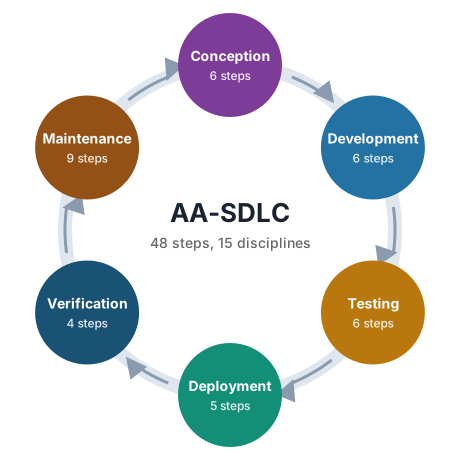
Six processes order the steps toward a goal. Fifteen disciplines own them. Every command below is a skill you can run; each links to its full description on the methodology page. This block is regenerated from the workflow data.
-
From a stakeholder conversation to a refined, prioritised, ticketed backlog with architecture decided.
Run discovery, Refine requirements, Prototype, Architect, Threat model, Break work into tickets.
-
From a ready ticket to merged, reviewed code with the tests that prove it.
Plan an implementation, Break a plan into tasks, Set up the development environment, Implement a ticket, Review code, Finish a branch.
-
From Development's proof of the requirement to a suite that goes beyond it.
Write a test strategy, Extend the test suite, Build end-to-end tests, Performance and load test, Security test, Exploratory testing.
-
From tested code to production, deliberately and repeatably.
Set up infrastructure, Set up the delivery pipeline, Prepare a release, Release to production, Roll back a release.
-
Confirming, from production and from the people who asked, that the release did what it claimed.
Set up observability, Validate production, User acceptance testing, Review interaction.
-

Keeping the system healthy, secure, documented, and improving after release.
Triage, Respond to an incident, Post-incident review, Fix a defect, Optimise performance, Analyse feedback and update the roadmap, Maintain security and compliance, Maintain documentation, Run a retrospective.
The framework's own work: bootstrapping a project, checking that the environment and repository meet the declared requirements, and growing the framework through extensions. It is not a software delivery discipline; it is what makes the other fourteen runnable.
Decides what to build and why, and in what order. Owns the outcome the software is meant to achieve, the measure of whether it did, and the roadmap that sequences the work. Product Management answers "should we", Business Analysis answers "what exactly".
Turns a business need into requirements the whole team can read and a test can execute. Discovers what stakeholders actually need, closes the gaps, writes it as Gherkin scenarios, and later confirms with those stakeholders that what was built is what they meant.
Makes requirements tangible before they are built and checks the result against real use afterwards. Produces mockups and prototypes that stakeholders react to, and reviews the built software for how people actually interact with it.
Decides how the system will be shaped and records why. Produces the architecture, the technology choices, and the decision records that let anyone later understand what was considered and rejected. Investigates unknowns with time-boxed spikes rather than guesses.
Finds what could go wrong before an attacker does. Threat models the architecture, turns the mitigations into requirements, tests the built system for the weaknesses that matter, and keeps dependencies, secrets, and compliance evidence current over the life of the system.
Turns requirements and priorities into a backlog of tickets that are ready to plan and build. Every ticket that leaves Refinement has scenarios, acceptance criteria, and a size, and is small enough to finish in one iteration.
Keeps the work flowing and visible. Plans iterations against capacity, reports status from the ticket system rather than from memory, and runs retrospectives that turn what happened into what changes next.
Plans how one ticket will be built before anyone builds it. Reads the scenarios, the architecture, and the code that exists, and writes a plan the ticket carries: what changes, where, in what order, with what tests, and what could go wrong.
Builds the software and proves it meets the requirement. Every change ships with the tests that show its scenarios pass, is reviewed, and is merged on a branch that references its ticket. Development owns "it works"; Testing owns "and here is what we did not think of".
Makes the test suite as comprehensive as is reasonable. Starts from the scenarios and the tests Development wrote, then applies general testing strategies to find what the requirement did not say. Every gap it finds becomes a question on the ticket and a scenario in the feature file.
Keeps what is written true. Documents each feature for the people who will use and maintain it, keeps the knowledge base aligned with the feature files and the code, and periodically audits the whole for drift.
Gets built, tested software into production deliberately and gets it back out if it must. Owns the version, the release notes, the go/no-go decision, the production deployment record, and rollback. Release Management never asks what to release; it asks whether it is ready.
Provides and runs the environments the software lives in. Infrastructure as code, the pipeline that delivers to it, the observability that shows what it is doing, and the validation that production behaves as the release claimed.
Is the front door for what goes wrong in production. Triages incoming incidents and requests into tickets with the right priority, coordinates response until the impact is contained, and runs the post-incident review that turns an incident into prevention.
Never lost, never stuck
Always know what's next, and what's left
With fifty-odd commands, the hardest question is often which one to run. /aa-fw-whatsnext answers it. It reviews your folder, your tickets, and your knowledge base against the framework's opinions and processes, stops at the first real gap it finds, and tells you the one thing to do about it. Every answer ends with the planned work that remains, so you know what is left as well as what is next.
It checks in a fixed order, because a later layer cannot be trusted while an earlier one is broken: there is no point choosing the next ticket while the last change broke the build.
-
Foundation
A repository, the project config, and a linked ticket project and knowledge base. On an empty folder, this is where it stops.
Next: aa init, then /aa-fw-init
-
Work in flight
Uncommitted changes, a branch that was never finished, a merge request waiting for review. Unfinished work comes before new work.
Next: /aa-dev-finish-branch with the branch's ticket
-
Recent changes
Each recent commit held to the opinions: it traces to a ticket, code changes carry tests, behaviour changes carry scenarios, significant decisions have records, and the build and tests pass.
Next: /aa-qa-generate-tests for the commit that changed code without a test
-
Knowledge
The pages linked to recent tickets still describe what the code now does, and no decision they cite has been superseded.
Next: /aa-doc-maintain-docs for the pages that drifted
-
The next ticket
When everything above is in order, the highest-priority ticket in the current iteration, and its state chooses the command.
Next: /aa-ip-plan-implementation for a refined ticket with no plan yet
Next:     /aa-qa-generate-tests ABC-142
Why:      a recent commit changed code and no test (O-07)
Evidence: 3f2a91c "feat(orders): export order history as CSV" changed src/Orders/Export.cs only
Layers:   foundation passed | work in flight passed | recent changes: gap
          knowledge not reached | next ticket not reached
Remaining: 7 open in Sprint 14: 2 new, 2 refined, 1 planned, 1 in progress, 1 in review
It changes nothing and never blocks. A system it cannot reach is reported as not checked, never as passed, and it carries on with the layers it can check. The requirement checks themselves belong to /aa-fw-health; /aa-fw-whatsnext uses them and decides what matters most.
What you get for free
Decisions already made for you
Most delivery problems are not technical. They are process problems: two branch conventions in one team, a test tier nobody set up, a decision that lived in someone's head, a size that was a guess. Every choice a team leaves open is another place the process can fail.
AA-SDLC settles the choices that do not make your product different, and settles them the same way in every repository. That takes whole categories of process failure off the table before the first ticket, and it gives your agent a project whose shape it already knows, so it spends its effort on your problem instead of on working out how you work.
| The decision | Settled as | What you get | Opinion |
|---|
| The systems of record | Every project has source control, a ticket manager, and a knowledge base; one repository maps to one ticket project | History, review, and rollback from the first commit; a ticket-based workflow in which every change has a home, an owner, and a status anyone can see; and project documentation kept in one central place, not scattered across drives and chat threads | O‑02, O‑03, O‑04, O‑09 |
|---|
| Knowledge base layout | Six top-level sections in every project: Overview, Requirements, Architecture, Operations, Releases, Guides; pages explain and index, and a superseded page is kept and linked, never deleted | Anyone, or any agent, knows where a page belongs before reading it, and knows which pages a change should have updated | O‑27 |
|---|
| Repository layout | One folder structure for every repository, whatever the stack | Anyone, or any agent, finds anything in any repository without asking | O‑05 |
|---|
| Build, test, and run | Root scripts for initialize, build, test, and pack; everything needed to build and operate it is versioned | A fresh clone runs with one command, and the pipeline calls the same scripts you do | O‑06, O‑16 |
|---|
| Test tiers | Unit, integration, and end-to-end tiers; end-to-end against containers; every test deterministic and independent | A suite you can trust on any machine, with no "works on mine" | O‑07, O‑12, O‑23 |
|---|
| Who tests what | Development proves the requirement; Testing goes beyond it | No gap where each side assumed the other covered it | O‑08 |
|---|
| Requirements | Gherkin scenarios on knowledge base pages, in tables anyone can read and edit, as the source of truth, written from goals rather than a mock-up; each ticket pulls its scenarios into the repository as feature files that review keeps from being edited by hand; every feature and scenario has a stable id that its tests name | Business analysts and product owners own the requirements where they already work, and every agent still reads them beside the code; requirements that run as tests, so "done" is checkable; and coverage measured by requirement, not by line | O‑01, O‑15 |
|---|
| Design | The simplest design that meets the scenarios that exist | No speculative layers to build, test, and maintain | O‑20 |
|---|
| Sizing and readiness | A size comes from implementation thinking; a refined ticket is checked against the repository before work starts | Estimates you can defend, and no work started on a stale plan | O‑10, O‑13 |
|---|
| Ticket life cycle | Five kinds (epic, story, task, bug, spike) and seven states (New, Refined, Planned, In progress, In review, Accepted, Done), each move made by the step that produces the evidence, mapped to your ticket system's own names | A board that means the same thing in every project, status that is evidence rather than an impression, and a next step anyone can read off the ticket | O‑26 |
|---|
| Commits | Conventional Commits, small and cohesive, made by the user, each tracing back to its ticket | A readable history, changelogs and version bumps from the log, and an answer to "why is this here?" | O‑14, O‑17, O‑19 |
|---|
| Decisions | Every significant decision is a numbered decision record | Settled questions stay settled; nobody re-argues them in six months | O‑18 |
|---|
| Dependencies | Added, updated, and removed through the package manager, never by hand | A lock file that always agrees with what is installed | O‑22 |
|---|
| Conventions | A static analyser with a committed rule set, started from a published best-practice baseline for your language, framework version, and kind of app, then tailored to your preferences with every departure recorded; a formatter settles layout | Conventions every person and every agent follows without being told, and reviews about the change, not about style | O‑21 |
|---|
| The delivery path | Every pipeline step runs locally; the artifact is built once and promoted; environment settings live apart from functional ones | A pipeline you can debug on your own machine, and a release that is exactly what was tested | O‑11, O‑24, O‑25 |
|---|
Still yours
Your language and stack, your ticket system, knowledge base, and source control host, your pipeline system, your tools, your team's shape, and every product decision. The framework settles how the work flows, never what you build or what you build it with.
Settled, not enforced
No step refuses to run because a project differs. The steps assume these choices, and /aa-fw-health tells you where your project departs from them and what each gap puts at risk, so adopting them is a list of small moves, not a migration.
Plugins
Extending it
Core stays small and names no technology. Anything specific to a stack or an organisation's process arrives as a plugin: a pack of skills installed with aa plugin install at user or project scope, each skill attached to a step or a requirement of the life cycle. See Plugins. Plugin skills are named after the plugin, so they sit beside the core steps without redefining them, and the CLI refuses a plugin that tries. Plugins never wrap a ticket system, a wiki, or source control; the agent's own connectors do that.
The framework also extends itself the same way it is used. Adding a tenet, an opinion, a discipline, a process, or a step is a step, each with its own command, and the structural validators and the framework's own Gherkin requirements hold the result to the same rules.
Scope
Where the methodology ends and the SDK begins
The methodology describes the whole life cycle, including roles where an agent sits in a meeting, takes the notes, and drafts the ticket. The SDK implements the coding-agent slice: the steps a developer runs from inside a coding agent against a repository, a ticket, and a knowledge base. The business case tells the wider story and states the assumptions behind its figures; the methodology lists every step the SDK delivers.